Color Dialog Control in VB.NET
Color Dialog Control allows user to select color from the list of available colors.
User can also define custom colors using Color Dialog control.
Properties of Color Dialog Control in VB.NET
| Property | Purpose |
Color |
It is used to get or set the color selected by the user in Color Dialog Control. It is also used set specific color in the Color Dialog Control. |
FullOpen |
It is used to specify weather Custom Color Section of the Color Dialog Control is by default displayed or not. It has Boolean value. Its default value is false. |
AllowFullOpen |
It is used to enable or disable Define Custom Color button In Color Dialog Control. It has Boolean value. Its default value is true. User can see effect of this property only when FullOpen property is set to false. |
AnyColor |
It is used to specify weather Color Dialog will display all the available colors in the set of basic colors or not. It has Boolean value. Default value is False. |
SolidColorOnly |
It is used to specify weather Color Dialog will restrict user to select only solid colors or not. It has Boolean value. Default value is False. |
Methods of Color Dialog Control in VB.NET
| Method | Purpose |
ShowDialog |
It is used to Show or run Color Dialog Control. |
Reset |
It is used to reset all the properties of ColorDialog to its default values. |
Example of Color Dialog Control in VB.NET
Design an application that allows user to set ForeColor of the Text entered in TextBox using ColorDialogControl.
Step 1: Design a form as shown below:
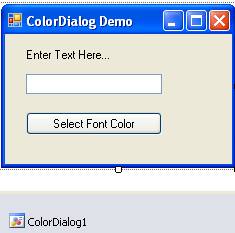
Step 2: Now set properties of various controls as given below:
| Control Name | Property Name | Value |
Form1 |
Text |
ColorDialog Demo |
Label1 |
Text |
Enter Text Here… |
TextBox1 |
Name |
txtName |
Button1 |
Name |
cmdSetColor |
Text |
Select Font Color |
|
ColorDialog1 |
Name |
ColorDialog1 |
AllowFullOpen |
True |
|
FullOpen |
True |
Step 3: Now Double click on Select Font Color Button and write following code to set fore color of the text.
txtName.ForeColor = ColorDialog1.Color
End If