Combo Box Control in VB.NET
 |
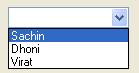
ComboBox control represents list of items in a drop down list type structure from which user can select only one item at a time.
User can drop down the list to display list of items in a ComboBox.
ComboBox control comes with built in TextBox so user can enter new item if it is not available in the list of ComboBox.
ComboBox is similar to a ListBox but it does not allow user to select more then one items.
It occupies less space on the form because of its drop down structure.
User can add new items, remove selected or all items from ComboBox at runtime or design time.
Properties of Combo Box Control in VB.NET
| Property | Purpose | ||||||
AutoComplete Mode |
It is used to get or set value which determines how AutoComplete option works for ComboBox. |
||||||
AutoCompleteSource |
It is used to get or set Auto Complete Source for ComboBox. |
||||||
AutoCompleteCustomSource |
It is used to specify Custom Source by defining list of items in it. It works when AutoCompleteSource is set to CustomSource. |
||||||
DropDownStyle |
It is used to get or set value which determines appearance and behavior style of ComboBox. It has three options: |
||||||
DropDownWidth |
It is used to get or set width of DropDown list in pixel. |
||||||
DropDownHeight |
It is used to get or set height of DropDown list in pixel. |
||||||
MaxDropDownItems |
It is used to get or set value which determines how many items should be display in dropdown list. For remaining items to display you need to scroll the dropdown list. Default value is 8. |
||||||
MaxLength |
It is used to get or set value which determines maximum number of characters that can be entered in built in TextBox of ComboBox. |
||||||
Text |
It is used to get or set text associated with built in TextBox of ComboBox. |
||||||
Items |
It represents collection of items contained in ComboBox control. |
||||||
Sorted |
It is used to specify weather items of ComboBox are sorted in alphabetical order or not. It has Boolean value. Default value is false. |
||||||
SelectedIndex |
It is used to get or set zero based index of the item currently selected in ComboBox. |
||||||
SelectedItem |
It is used to get or set item currently selected in ComboBox. |
||||||
SelectionStart |
It is used to get or set starting index of the text that is entered in the built in TextBox of ComboBox. |
||||||
Selectionlength |
It is used to get or set number of characters that is selected in the built in TextBox of ComboBox. |
||||||
SelectedText |
It is used to get or set text that is selected in built in TextBox of ComboBox. |
||||||
Enable |
It is used to specify weather ComboBox Control is enabled or not at runtime. It has Boolean value. Default value is true. |
||||||
Visible |
It is used to specify weather ComboBox Control is visible or not at runtime. It has Boolean value. Default value is true. |
||||||
TabStop |
It is used to specify weather user can use TAB key to set focus on ComboBox Control or not. It has Boolean value. Default value is true. |
||||||
Methods of Combo Box Control in VB.NET
| Method | Purpose |
FindString |
It is used to find first occurrences of an item in the ComboBox that partially match with string specified as an argument. If an item is found than it returns zero based index of that item, otherwise it returns -1. The search performed by this method is case insensitive. |
FindStringExact |
It is used to find first occurrences of an item in the ComboBox that exactly match with string specified as an argument. If an item is found than it returns zero based index of that item, otherwise it returns -1. The search performed by this method is case insensitive. |
SelectAll |
It is used to select all the text in the built in TextBox of ComboBox. |
Select |
It is used to select all or specific range of the text in the built in TextBox of ComboBox. |
Events of Combo Box Control in VB.NET
| Event | Purpose |
SelectedIndexChanged |
It is the default event of ComboBox Control. It fires each time a selected Item in the ListBox is changed. |
TextChanged |
It fires each time a text is changed in the built in TextBox of ComboBox Control. |
DropDown |
This event fires each time a DropDown list is displayed by clicking on DropDown arrow. |
DropDownClosed |
This event fires each time a DropDown list is disappeared after selecting particular Item. |