InputBox Function in VB.NET
InputBox function display a prompt in the form of dialog box as shown below and waits for the user to input some value in textbox or click a button.
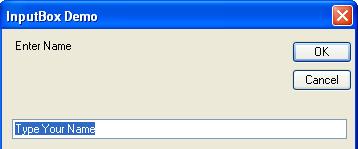
If user clicks on OK button then it will return content of textbox in the form of string.
If user clicks on Cancel Button then it will return a blank value.
Here,
(1) Prompt is a compulsory argument. The String that you specify as a Prompt will display as a message in the InputBox Dialog.
(2) Title is an optional Argument. The String that you specify as a Title will display in the title bar of the InputBox. If you skip this argument then name of the application will display in the title bar.
(3) DefaultResponse is an Optional Argument. The String that you specify as a DefaultResponse will display as a default value in the textbox of the InputBox. If you skip this argument then Textbox of the InputBox is displayed empty.
(4) XPos is an Optional Argument. It Specify the distance (in pixel) of the left edge of the Input box from the left edge of the screen.
(5) YPos is an Optional Argument. It Specify the distance (in pixel) of the upper edge of the Input box from the top edge of the screen.
Note: If you skip XPos and YPos then InputBox will display in the centre of the screen.
Example of InputBox Function in VB.NET
Design a simple application that ask user to enter name and display it in label using Input Box Function.
Step 1: Design a form as shown below:
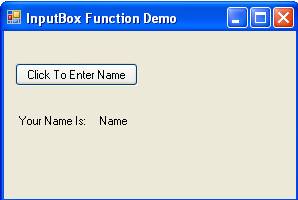
Step 2: Now set properties of various controls as given below:
| Control Name | Property Name | Value |
Form1 |
Text |
Input Box Function Demo |
Button1 |
Name |
cmdName |
Text |
Click To Enter Name |
|
Label1 |
Text |
Your Name Is: |
Label2 |
Name |
lblName |
Text |
Name |
Step 3: Now Double click on Click To Enter Name Button and write following code display Input Box and enter name.