General or Sub Procedure in VB.NET
A general procedure is a group of logically related statements that are used to perform a specific task.
It is also known as sub procedure.
You can pass arguments to the Sub procedure but the only limitation with the sub procedure is that it does not return any value.
Sub procedure can be defined using Sub and End Sub keywords.
The general syntax for creating a sub procedure is given below:
Group of Related statements
End Sub
Here,
(1) Scope: It is optional. It defines scope of the procedure. It can have either Public, Private or Protected scope. If don’t specify then by default it is Public.
(2) Procedure Name is the name of sub procedure that you want to define.
(3) Argument List is optional. Some Procedure accepts argument while some does not accept arguments.
As event procedure is invoked automatically when user interact with particular control. Sub procedure does not invoke automatically. User has to call sub procedure explicitly.
Sub Procedure can be called using one of the following to methods:
OR
(2) ProcedureName [Argument List]
Example of Sub Procedure
Design an application using Sub Procedure to find maximum from two numbers.
Step 1: Design a form as shown below:
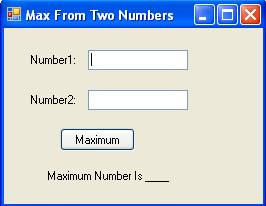
Step 2: Now set properties of various controls as given below:
| Control Name | Property Name | Value |
Form1 |
Text |
Max From Two Numbers |
Label1 |
Text |
Number1: |
Label2 |
Text |
Number2: |
TextBox1 |
Name |
txtNumber1 |
TextBox2 |
Name |
txtNumber2 |
Button1 |
Name |
cmdMax |
Text |
Maximum |
|
Label3 |
Name |
lblMax |
Text |
Maximum Number Is ___ |
Step 3: Now define a Sub procedure named Maximum as given below:
If a > b Then
lblMax.Text = "Maximum Number is " & a
Else
lblMax.Text = "Maximum Number is " & b
End If
End Sub
Step 4: Now double click on Maximum Button and write following code to call Sub Procedure.