Event Procedure in VB.NET
An event is an action that is performed when user interact with particular control.
The event is recognized by the control but it can not perform any action unless you define some code in that event. The code defined along with the event is known as event procedure.
Every control having their own events. For example a button having click event which occurs when user click on a button.
In order to generate event procedure double click on the control. As you double click on the control it will generates default event associated with it as shown below:
End Sub
The default scope of the procedure is private which means you can not access event procedure outside the form.
A control can have one or more events associated with it.
If you want to define event other then default event you can define it by selecting the name of event from event ComboBox available at the top right side of the code window as shown below:
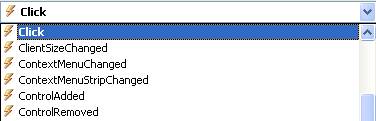
Event procedure is directly associated with controls so there is no need to call it. It is invoked automatically when user interact with that control. For Example click event of the button is invoked when user clicks the button.
Example of Event Procedure
Design an application using Event Procedure to find maximum from two numbers.
Step 1: Design a form as shown below:
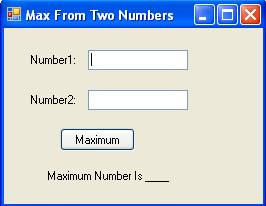
Step 2: Now set properties of various controls as given below:
| Control Name | Property Name | Value |
Form1 |
Text |
Max From Two Numbers |
Label1 |
Text |
Number1: |
Label2 |
Text |
Number2: |
TextBox1 |
Name |
txtNumber1 |
TextBox2 |
Name |
txtNumber2 |
Button1 |
Name |
cmdMax |
Text |
Maximum |
|
Label3 |
Name |
lblMax |
Text |
Maximum Number Is ___ |
Step 3: Now Double click on Maximum Button and write following code in the click event of button.
lblMax.Text = "Maximum Number is " & txtNumber1.Text
Else
lblMax.Text = "Maximum Number is " & txtNumber2.Text
End If