Examples of Datetimepicker Control in VB.NET
Example 1: Design an application that ask user to enter birth date and display user’s age (in days) using DateTimePicker Control.
Step 1: Design a form as shown below:
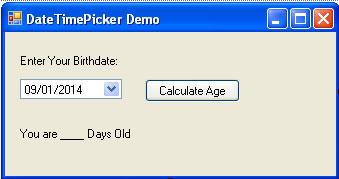
Step 2: Now set properties of various controls as given below:
| Control Name | Property Name | Value |
Form1 |
Text |
DateTimePicker Demo |
Label1 |
Text |
Enter Your Birthdate: |
DateTimePicker1 |
Name |
dtDate |
Format |
Short |
|
Button1 |
Name |
cmdCalculate |
Text |
Calculate Age |
|
Label2 |
Name |
lblDay |
Text |
You are ____ Days Old |
Step 3: Now Double click on Calculate Age Button and write following code to calculate age.
Dim curdate As DateTime
Dim day As TimeSpan
bdate = dtDate.Value
curdate = Now.Date
day = curdate.Subtract (bdate)
lblDay.Text = "You are " & CInt (day.TotalDays) & " Days Old"
Example 2: Design an application that ask user to select event start date and event end date and display total number of days the event will continue using DateTimePicker Control.
Step 1: Design a form as shown below:
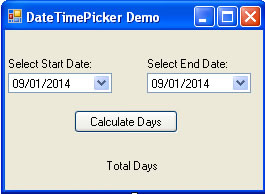
Step 2: Now set properties of various controls as given below:
| Control Name | Property Name | Value |
Form1 |
Text |
DateTimePicker Demo |
Label1 |
Text |
Select Start Date: |
DateTimePicker1 |
Name |
dtStart |
Format |
Short |
|
Label2 |
Text |
Select End Date: |
DateTimePicker2 |
Name |
dtEnd |
Format |
Short |
|
Button1 |
Name |
cmdCalculate |
Text |
Calculate Days |
|
Label3 |
Name |
lblTotal |
Text |
Total Days |
Step 3: Now Double click on Calculate Days Button and write following code to calculate age.
Dim enddate As DateTime
Dim total As TimeSpan
startdate = dtStart.Value
enddate = dtEnd.Value
total = enddate.Subtract(startdate)
lblTotal.Text = CInt(total.TotalDays)