Example of Radio Button Control in VB.NET
Design an application that ask user to select Hotel Type and Room Type and display selected option using Radio Button Control.
Step 1: Design a form as shown below:
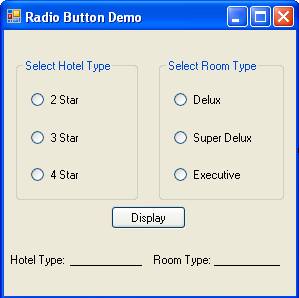
Step 2: Now set properties of various controls as given below:
| Control Name | Property Name | Value |
Form1 |
Text |
Radio Button Demo |
GroupBox1 |
Text |
Select Hotel Type |
GroupBox2 |
Text |
Select Room Type |
RadioButton1 |
Name |
rd2Star |
Text |
2 Star |
|
Checked |
True |
|
RadioButton2 |
Name |
rd3Star |
Text |
3 Star |
|
RadioButton3 |
Name |
rd4Star |
Text |
4 Star |
|
RadioButton4 |
Name |
rdDelux |
Text |
Delux |
|
Checked |
True |
|
RadioButton5 |
Name |
rdSuper |
Text |
Super Delux |
|
RadioButton6 |
Name |
rdExecutive |
Text |
Executive |
|
Button1 |
Name |
cmdDisplay |
Text |
Display |
|
Label1 |
Text |
Hotel Type: |
Label2 |
Name |
lblHotel |
Text |
__________ |
|
Label3 |
Text |
Room Type: |
Label4 |
Name |
lblRoom |
Text |
__________ |
Step 3: Now Double click on Display Button and write following code to display selected options.
Dim HotelType As String
Dim RoomType As String
If rd2Star.Checked = True Then
HotelType = "2 Star"
ElseIf rd3Star.Checked = True Then
HotelType = "3 Star"
Else
HotelType = "4 Star"
End If
lblHotel.Text = HotelType
If rdDelux.Checked = True Then
RoomType = "Delux"
ElseIf rdSuper.Checked = True Then
RoomType = "Super Delux"
Else
RoomType = "Executive"
End If
lblRoom.Text = RoomType