Example of Label,Textbox and Button Control
An application that accepts two numbers from user and perform addition, subtraction, multiplication and division of two numbers using Label, TextBox and Button Control.
Design a form as shown below:
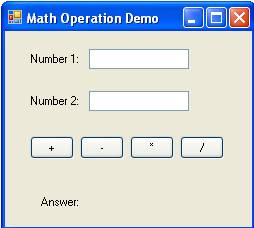
Now set the properties of various controls as given below:
| Control Name | Property Name | Value |
Form1 |
Text |
Math Operation Demo |
Label1 |
Text |
Number 1: |
Label2 |
Text |
Number 2: |
TextBox1 |
Name |
txtNum1 |
TextBox2 |
Name |
txtNum2 |
Button1 |
Name |
cmdAdd |
Text |
+ |
|
Button2 |
Name |
cmdSub |
Text |
- |
|
Button3 |
Name |
cmdMul |
Text |
* |
|
Button4 |
Name |
cmdDiv |
Text |
/ |
|
Label3 |
Text |
Answer |
Label4 |
Name |
lblAns |
Text |
|
Declare variables in the general declaration section as given below:
Dim b As Integer
Now double click on + Button and write following code to add two numbers.
b = Val(txtNum2.Text)
lblAnswer.Text = a + b
Now double click on - Button and write following code to add two numbers.
b = Val(txtNum2.Text)
lblAnswer.Text = a - b
Now double click on * Button and write following code to add two numbers.
b = Val(txtNum2.Text)
lblAnswer.Text = a * b
Now double click on / Button and write following code to add two numbers.
b = Val(txtNum2.Text)
lblAnswer.Text = a / b